
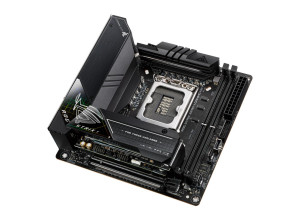
ASUS ROG-STRIX-Z690-I-GAMING-WIFI Intel Z690 LGA 1700 mini ITX - ASUS
Beskrivning
ROG STRIX Z690-I GAMING WIFI The ROG Strix Z690-I Gaming WiFi packs premium-grade power delivery and triple-decker cooling into a compact mini-ITX form factor to unleash the full force of 12th Gen Inte Core processors. Framerates and load times can be boosted even further by all-new support for DDR5 memory and PCI 5.0. Plus, onboard WiFi 6E and PCIe 4.0 M.2 slots bring lightning-fast performance to an endless variety of scenarios. On top of all that, DIY-friendly innovations help simplify the PC building process, so even novice builders can quickly get to serious gaming. POWER DESIGN Digital power control and an array of power stages provide the muscle needed to control the latest Intel CPUs. Integrated I/O Cover and VRM Heatsinks Connected by an L-shaped heat pipe, the two VRM heatsinks and aluminum I/O cover provide ample mass and surface area to deal with the thermals of Intels latest processors. Thermal Pads Specially engineered thermal pads efficiently transfer heat from the inductor and phase array to the heatsink. Triple-decker heatsink The new triple-decker heatsink is cleverly designed to stack two M.2 slots, both with Q-Latch and full-size, double-sided heatsinks with thermal pads. And theres a beefy chipset heatsink at the bottom to deliver great cooling performance. COOLER BY DESIGN ROG Strix Z690 series features the most comprehensive cooling options ever, configurable via Fan Xpert 4 or the UEFI BIOS. CPU Fan Header A dedicated pair of PWM/DC fan headers for CPU coolers. AIO Pump Fan Header A dedicated PWM/DC header for self-contained water-cooling setups. M.2 Heatsink Keeps the M.2 SSD at the optimum operating temperature for consistent performance and reliability. M.2 Backplate Provides additional mass to deal with the thermal load of high-performance M.2 drives. 4-Pin PWM/DC Fan Header Each header supports auto-detection of PWM or DC fans. *Support ASUS HYDRANODE ROG Front Panel SATA Card The ROG Strix Z690-I Gaming WiFi comes with an expansion card that provides additional functionality including four SATA ports, one ARGB lighting header, and connectors for a front panel header and a PC speaker. This efficient use of space enables builders to construct some of the most compact PC builds with full feature, or could also connect the power button via the 2-pin Power_BTN onboard for even more compact builds. DUAL THUNDERBOLT 4 PORTS Mini-ITX systems often find homes in entertainment centers for HTPC duty. The ROG Strix Z690-I Gaming WiFi stands ready with dual Thunderbolt 4 USB C ports on the rear I/O panel whose bidirectional 40 Gbps connectors can handle two external 4K displays at once, plus a variety of other compatible accessories. WIFI 6E (802.11 AX) Onboard WiFi 6E technology takes advantage of the newly available radio spectrum in the 6 GHz band. It provides up to three times the bandwidth of the 5 GHz band and up to seven 160 MHz bands to deliver ultrafast wireless networking speeds and improved capacity as well as better performance in dense wireless environments. *WiFi 6E availability and features are dependent on regulatory limitations and co-existence with 5 GHz WiFi. Intel 2.5 Gb Ethernet Onboard 2.5 Gb Ethernet gives your wired connection a boost, with up to a 2.5X improvement over standard Ethernet connections for faster file transfers, smoother lag-free gaming and high-res video streaming. SUPREMEFX ROG SupremeFX is a unique blend of hardware and software that provides superior audio. In ROG Strix Z690-I Gaming WiFi, SupremeFX features the ALC4080 codec to increase playback resolution from 192 kHz to 384 kHz across all channels. The front-panel output is streamed through a highly integrated Savitech amplifier thats capable of driving of a wide variety of gaming headsets and high-fidelity headphones. UNDENIABLY ROG STRIX The ROG Strix Z690-I Gaming WiFi design language is defined by futuristic grids and meshes that may seem low-key at first, until users gaze upon the lower left-hand corner that glows with an iridescent grid pattern. HEATSINK DESIGN WITH EASY DIY IN MIND To enable a smooth DIY experience, two stacked M.2 slots are secured by a connector and a set of screws. M.2 Q-LATCH The innovative Q-Latch makes it easy to install or remove an M.2 SSD without the need for specific tools. The design employs a simple locking mechanism to secure the drive and neatly eliminate traditional screws. CLR CMOS BUTTON A quick press of the Clr CMOS button helps reset BIOS settings. It can also be used to reboot the PC if incorrect BIOS settings have been selected. BIOS FLASHBACK BUTTON BIOS FlashBack is the simplest and safest way to update BIOS. Simply drop the (UEFI) BIOS file onto a FAT32-formatted USB stick, and plug it into the USB BIOS FlashBack port and press the button. Updates can