
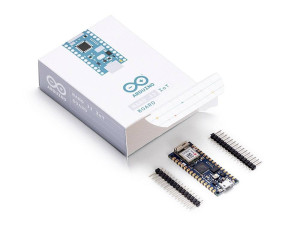
Arduino Nano 33 IoT development board - Arduino Nano 33 IoT,
Beskrivning
The Arduino Nano 33 IoT is the easiest and cheapest point of entry to enhance existing devices (and creating new ones) to be part of the IoT and designing pico-network applications. Whether you are looking at building a sensor network connected to your office or home router, or if you want to create a BLE device sending data to a cellphone, the Nano 33 IoT is your one-stop-solution for many of the basic IoT application scenarios. The board's main processor is a low power Ar Corte-M0 32-bit SAMD21. The WiFi and Bluetoot connectivity is performed with a module from u-blox, the NINA-W10, a low power chipset operating in the 2.4GHz range. On top of those, secure communication is ensured through the Microchi ECC608 crypto chip. Besides that, you can find a 6 axis IMU, what makes this board perfect for simple vibration alarm systems, pedometers, relative positioning of robots, etc. WiFi and Arduino IoT CloudAt Arduino we have made connecting to a WiFi network as easy as getting an LED to blink. You can get your board to connect to any kind of existing WiFi network, or use it to create your own Arduino Access Point. The specific set of examples we provide for the Nano 33 IoT can be consulted at thWiFiNINA library reference page. It is also possible to connect your board to different Cloud services, Arduino's own among others. Here some examples on how to get the Arduino boards to connect to: Arduino's own IoT CloudArduino's IoT Cloud is a simple and fast way to ensure secure communication for all of your connected Things. Check it ouhere Blynksimple projecfrom our community connecting to Blynk to operate your board from a phone with little code IFTTTsee an in-depth case obuilding a smart pluconnected to IFTTT AWS IoT Corewe madthis examplon how to connect to Amazon Web Services Azurevisithis github repositorexplaining how to connect a temperature sensor to Azure's Cloud Firebaseyou want to connect to Google's Firebasethis Arduino librarwill show you how Note: while most of the above-shown examples are running on the MKR WiFi 1010, both boards have the same processor and wireless chipset, which means it will be possible to replicate them with the Nano 33 IoT. Bluetoot and BLE The communications chipset on the Nano 33 IoT can be both a BLE and Bluetoot client and host device. Something pretty unique in the world of microcontroller platforms. If you want to see how easy it is to create a Bluetoot central or a peripheral device, explore the examples at ouArduinoBLE library. We Make it Open for you to Hack Along The Nano 33 IoT is a dual processor device that invites for experimentation. Hacking the WiFiNINA module allows you to, for example, make use of both WiFi and BLE / Bluetoot at once on the board. Yet another possibility is having a super-lightweight version of linux running on the module, while the main microcontroller controls low level devices like motors, or screens. These experimental techniques, require advanced hacking on your side. They are possible via modifying the module's firmware that you can find aour github repositories. BEWARE: this kind of hacking breaks the certification of your WiFiNINA module, do it at your own risk. Related Boards If you are looking at upgrading from previous Arduino designs, or if you are just interested in boards with similar functionality, at Arduino you can find: Arduino MKR WiFi 1010the Pro version of the Nano 33 IoT, lacks the accelerometer, but includes a battery charger, and the Arduino Eslov connector for external I2C boards. Read morhere. Arduino Uno WiFi rev2the education version of the MKR WiFi 1010, with USB-B connector and embedded accelerometer. Read morhere. MKR WiFi 1000can only run WiFi applications, as it includes a different chipset than the Nano 33 IoT. Read more about ihere. Getting Started ThGetting Startesection contains all the information you need to configure your board, use the Arduino Software (IDE), and start tinkering with coding and electronics.
Processor
- Microcontroller model: ATSAMD21G18
- Microcontroller frequency: 48 MHz
Memory
- Flash memory (microcontroller): 256 KB
- SRAM (Static Random Access Memory): 32 KB
Ports & interfaces
- USB ports quantity: 1
- Number of digital I/O pins: 14
- Number of analog I/O pins: 9
- PWM digital I/O pins: 11
- UART: Y
- SPI interface: Y
- I2S interface: Y
Weight & dimensions
- Board dimensions: 45 x 18 mm
- Weight: 5 g
Power
- DC input voltage: 21 V
- Operating voltage: 3.3 V
- DC current per I/O pin: 7 mA