
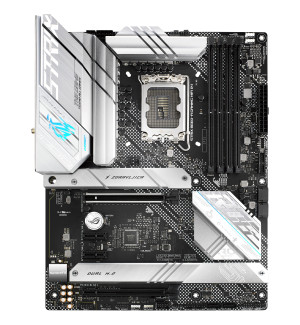
ASUS ROG STRIX B660-A GAMING WIFI D4 Intel B660 LGA 1700 ATX - ASUS
Beschrijving
ROG STRIX B660-A GAMING WIFI D4 ROG Strix B660-A Gaming WiFi D4 offers premium power delivery and optimized cooling to unleash the full force of the latest 12th Gen Inte Core processors. Onboard PCI 5.0, WiFi 6 and three PCIe 4.0 M.2 slots provide lightning-fast data transfers for an endless variety of scenarios, and ASUS-exclusive intelligent controls to help optimize PC settings. On top of all that, DIY-friendly innovations help simplify the PC building process to get to you up and running smoothly. TEAMED POWER STAGES 12+1 power stages combine high-side and low-side MOSFETS and drivers into a single package, delivering the power and efficiency that the latest Intel processors can take full advantage of. ALLOY CHOKES AND CAPACITORS High-end chokes and durable capacitors are engineered to resist extreme temperatures, enabling performance that exceeds industry standards. PROCOOL POWER CONNECTOR The ASUS ProCool socket is built to exacting specifications to ensure flush contact with the PSU power lines, enabling lower impedance and better heat dissipation. DIGI+ POWER CONTROL The Digi+ voltage regulator module (VRM) is one of the finest in the industry, ensuring ultra-smooth and clean power delivery to the CPU. SIX-LAYER PCB A multi-layered printed circuit board design quickly dissipates heat around the voltage regulators to improve overall system stability and provide the CPU with more overclocking headroom. COOLER BY DESIGN ROG Strix B660 motherboards feature comprehensive cooling options that configurable via the Fan Xpert 4 tool in Armoury Crate or within the UEFI BIOS. CPU Fan Headers A dedicated pair of PWM/DC fan headers for CPU coolers. AIO Pump Fan Header A dedicated PWM/DC header for self-contained water-cooling setups. M.2 Heatsink Keeps a mounted M.2 SSD at the optimum operating temperature for consistent performance and reliability. 4-Pin PWM/DC Fan Header Each header supports auto-detection of PWM or DC fans. TWO-WAY AI NOISE CANCELATION This powerful ASUS-exclusive utility leverages a massive deep-learning database to reduce background noise from the microphone* and incoming audio while preserving voices. Distracting keyboard clatter, mouse clicks and other ambient noises are removed so you can hear and be heard with perfect clarity while gaming or during calls. *A splitter cable is necessary when using a 3.5 mm headset. AI COOLING ASUS AI Cooling technology automatically manages and controls motherboard-connected fans to ensure optimal settings based on current system load and temperature. SELF-ADAPTIVE FAN TUNING CPU temperature detection AI Cooling detects CPU temperatures and uses a proprietary algorithm to calculate the lowest fan speed required to effectively cool the system and keep fan noise down. Automated optimization Under stable system loads, the software then automatically lowers fan* speed to the optimal setting, decreasing fan noise without compromising performance. *Fans need to be connected to the following headers for AI Cooling control: CPU_FAN / CPU_OPT / CHA_FAN / M.2_FAN / H_AMP / RAD_FAN Ongoing monitoring AI Cooling continues to monitor the system and adjust fan speed based on current load. AI NETWORKING The proprietary ROG GameFirst VI utility is designed to help all users beginners, experts, and everyone in between optimize network settings to ensure smooth online gameplay. New to this generation, GameFirst VI features AI-enhanced identification and boost technologies to ensure faster and smarter network optimization. Identification GameFirst VI analyzes usage patterns and the digital signatures of your applications and compares them to a database of over 200,000 apps. Boost GameFirst VI intelligently switches application priority and adjusts bandwidth, depending on the situation. When gaming, it accelerates and prioritizes game packets to give you supersmooth online gameplay even when you're streaming high-quality video or transferring large files. Visualization An intuitive graph provides an overview of real-time network status. Simply click on the tab to view the current bandwidth usage of each application, geolocation status of each network connection, or an analysis of the WiFi channels. WHAT IT DOES ADAPTIVE INTELLIGENCE GameFirst VI notes what you're currently doing and adjusts bandwidth accordingly to ensure smooth online experiences, even when multitasking. GAMING FIRST MODE Gaming First mode leverages a massive application database and an analysis of your frequently used apps to prioritize gaming network traffic. This reduces jitter and decreases ping to give you lag-free online gaming. NETWORK INSIGHT WIFI Quick Assist analyzes network information and generates a graph to give you a clear picture of current network status. In addition,